Knowledge Sharing -SICF- How to disable splash screen in portal

Thanks to my colleague for sharing his knowledge on the SICF the diagram attached we can disable the splash screen and the last sign on.
Thanks to Mohd Shahrir Azman from basis team the tiger company
Note: Changing payslip in portal
source : http://forums.sdn.sap.com/thread.jspa?threadID=1909760&tstart=15#10075902
You need to make a new form using smartforms and put it in EDPDF .
1. HRFOR - This feature decides whether to use HRFORMS or CEDT forms
(configured in PE51) for the payslip. If HRFORMS, the name of HRFORM has
to be mentioned here. If PE51 needs to be used then $CEDT$ should be
specified.
2. EDTIN - This should hold the value of the variant to be executed in
the CEDT program (payslip program). The variant should be proper with
the with the correct CEDT (payslip) form name and other parameters.
3. EDPDF - The name of the smartform (standard smartform
HR_ESS_PAYSLIP_TO_PDF or customer specific form) used to show the output
in the ESS.
You need to make a new form using smartforms and put it in EDPDF .
1. HRFOR - This feature decides whether to use HRFORMS or CEDT forms
(configured in PE51) for the payslip. If HRFORMS, the name of HRFORM has
to be mentioned here. If PE51 needs to be used then $CEDT$ should be
specified.
2. EDTIN - This should hold the value of the variant to be executed in
the CEDT program (payslip program). The variant should be proper with
the with the correct CEDT (payslip) form name and other parameters.
3. EDPDF - The name of the smartform (standard smartform
HR_ESS_PAYSLIP_TO_PDF or customer specific form) used to show the output
in the ESS.
Defining Work Area and sub Area for Portal
Login to R/3 server and using T-Code SPRO, navigate to IMG-> Cross Application Components ->
Homepage Framework->Resources ->Define Resources ->Define Resources (Add Entries). Click on New
Entries.
Add resource for Area page as follows. Enter the PCD of the New Area Page you have created in the text
box ‘URL of PCD Page’. Remember to prefix ‘ROLES://’ to the pcd location.

Homepage Framework->Resources ->Define Resources ->Define Resources (Add Entries). Click on New
Entries.
Add resource for Area page as follows. Enter the PCD of the New Area Page you have created in the text
box ‘URL of PCD Page’. Remember to prefix ‘ROLES://’ to the pcd location.
SAP Portal - how to restore iview ('remove from page' problem)
how to clean up 'remove from page' problem
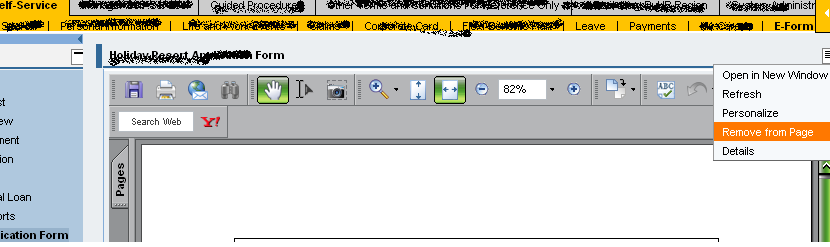
Problem : User remove iview "remove from page".
Solution :
1. Log into portal as admin.
2. Goto - System Administration - Support Desk - Portal Content Directory.
3. Click on Personalization cleanup.
4. Click on the radio button Principal.
5. Select the user login id.
6. Click Show.
7. Click into the "Logon ID"
8. Select the PCD URL on the users personalization
9. Click Remove.
Done
Graphical solution is below
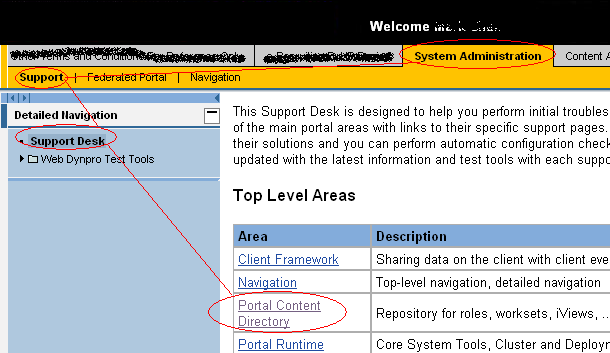
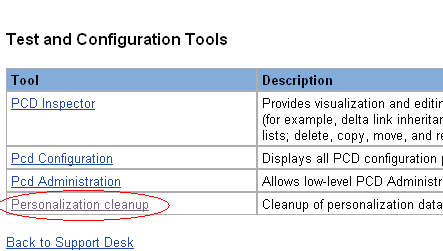
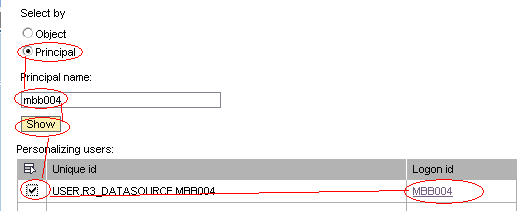
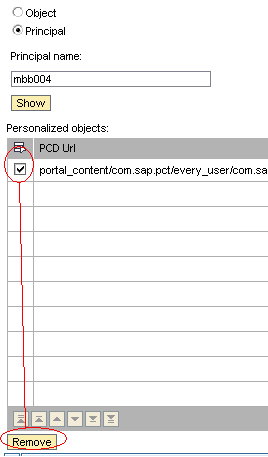
* Remember if you want to disable the user from doing the removing part.
remember to set in property of the page and select no option
"remove iview" option.
Problem : User remove iview "remove from page".
Solution :
1. Log into portal as admin.
2. Goto - System Administration - Support Desk - Portal Content Directory.
3. Click on Personalization cleanup.
4. Click on the radio button Principal.
5. Select the user login id.
6. Click Show.
7. Click into the "Logon ID"
8. Select the PCD URL on the users personalization
9. Click Remove.
Done
Graphical solution is below
* Remember if you want to disable the user from doing the removing part.
remember to set in property of the page and select no option
"remove iview" option.
Sap portal : Navigation link not appearing
Recently problem occurred where the navigation links seems to be missing
workaround:
my-career area appeared after removing setting in roles and workset;
1.login as admin; goto
Portal content
content provided y sap
end user content
employee self service
custom content
my career
workset mycareer -> select properties -> goto leaf folder and click no;
2. .login as admin; goto
Portal content
content provided y sap
end user content
employee self service
custom content
roles-> ESS -> click on the workset my career inside roles and select properties ->
goto leaf folder and click no
Conclusion make sure both are sync-ed
Last and not least if you want fast results
goto system administrator
-> navigation -> navigation cached and clear everything
workaround:
my-career area appeared after removing setting in roles and workset;
1.login as admin; goto
Portal content
content provided y sap
end user content
employee self service
custom content
my career
workset mycareer -> select properties -> goto leaf folder and click no;
2. .login as admin; goto
Portal content
content provided y sap
end user content
employee self service
custom content
roles-> ESS -> click on the workset my career inside roles and select properties ->
goto leaf folder and click no
Conclusion make sure both are sync-ed
Last and not least if you want fast results
goto system administrator
-> navigation -> navigation cached and clear everything
Portal Front End : WebDynpro or BSP application in iview not working
1. Please do an activation using back end - using transaction CODE "SICF"
2. After activation please do refresh portal.
* this is the common error where we normally have after deploying NEW program

2. After activation please do refresh portal.
* this is the common error where we normally have after deploying NEW program
Problem encounter
Recently i was assigned a task to create a custom made help page.
The steps takaen :
1. SE80.
2. Create a BSP.
3. Create iview
4. enable the masthead.
5. Put all mime inside.including all the pages.
Trasport from dev to test was A-OK
But when transported to production there seems to be a probblem which i am unablet to solve at the moment
after googling and doing some research. The pages i have found ask us to
Assigning MIME Objects to a Transport Request under Structure linkOther Functions.
Link : http://help.sap.com/saphelp_webas630/helpdata/en/46/bb182fab4811d4968100a0c94260a5/content.htm
which leads to ask us to
Select the required directory, subdirectory, or individual MIME objets in the browser of the MIME Repository and choose Write Transport Request in the context menu.
Link : http://saphelp.border-states.com/EN/46/bb1841ab4811d4968100a0c94260a5/frameset.htm
Which i am going to try tomorrow with my user.
that's all for now

The steps takaen :
1. SE80.
2. Create a BSP.
3. Create iview
4. enable the masthead.
5. Put all mime inside.including all the pages.
Trasport from dev to test was A-OK
But when transported to production there seems to be a probblem which i am unablet to solve at the moment
after googling and doing some research. The pages i have found ask us to
Assigning MIME Objects to a Transport Request under Structure linkOther Functions.
Link : http://help.sap.com/saphelp_webas630/helpdata/en/46/bb182fab4811d4968100a0c94260a5/content.htm
which leads to ask us to
Select the required directory, subdirectory, or individual MIME objets in the browser of the MIME Repository and choose Write Transport Request in the context menu.
Link : http://saphelp.border-states.com/EN/46/bb1841ab4811d4968100a0c94260a5/frameset.htm
Which i am going to try tomorrow with my user.
that's all for now
How to disable or enable the help link in masthead iView
Refer to this link on how to go to masthead Iview
Show Link in Masthead: Help < NO >
* To disable or enable the help link on the top frame of the portl
The actual location of the iview
Portal Content
+ Content Provided by SAP
+ Admin Interfaces
+ Admin iView Templates
+ Portal Editors
Masthead

Show Link in Masthead: Help < NO >
* To disable or enable the help link on the top frame of the portl
The actual location of the iview
Portal Content
+ Content Provided by SAP
+ Admin Interfaces
+ Admin iView Templates
+ Portal Editors
Masthead
Portal HelpLink How to Change

Go to
portal content ->
Portal users ->
Default framework page,
right click and choose edit.
In the editor on the right,
- select masthead iView and choose properties .
- You will find "URL of Help Link"
- You can Key in the new URL for the Help

2008 July 23 Portal Content July 24 Portal By Chin
Creating I View
Step01
Step02
Step03
Step04
Step05
Step06
Step07
Create Page
Step01
Step02
Step03
Step04
Add Iview to pages
Step01
Adding Pages to Roles
Step01
Roles(Worksets)
Workset(Pages)
Pages(Iview)
How to go to roles?
PortalContent->ContentProvidedBySAP
-End-UserContent
-Roles
-employee_self_service
By opening the page that you created and the roles opened.
You click on the roles in the category and then go to the tree view and add page to roles.
How to add to back end?
SPRO - > IMG -> PersonalManagement -> EmployeeSelfService -> Homepage FrameWork -> Resources -> Define Resources
*Make sure you have the PCD example //pcd......
**Add into the selected module Roles://pcs....
Step01
Step02
Step03
Step04
Step05
Step06
Step07
Create Page
Step01
Step02
Step03
Step04
Add Iview to pages
Step01
Adding Pages to Roles
Step01
Roles(Worksets)
Workset(Pages)
Pages(Iview)
How to go to roles?
PortalContent->ContentProvidedBySAP
-End-UserContent
-Roles
-employee_self_service
By opening the page that you created and the roles opened.
You click on the roles in the category and then go to the tree view and add page to roles.
How to add to back end?
SPRO - > IMG -> PersonalManagement -> EmployeeSelfService -> Homepage FrameWork -> Resources -> Define Resources
*Make sure you have the PCD example //pcd......
**Add into the selected module Roles://pcs....