SAP Portal - how to restore iview ('remove from page' problem)
how to clean up 'remove from page' problem
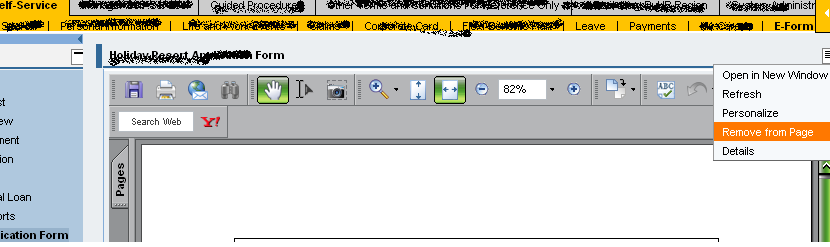
Problem : User remove iview "remove from page".
Solution :
1. Log into portal as admin.
2. Goto - System Administration - Support Desk - Portal Content Directory.
3. Click on Personalization cleanup.
4. Click on the radio button Principal.
5. Select the user login id.
6. Click Show.
7. Click into the "Logon ID"
8. Select the PCD URL on the users personalization
9. Click Remove.
Done
Graphical solution is below
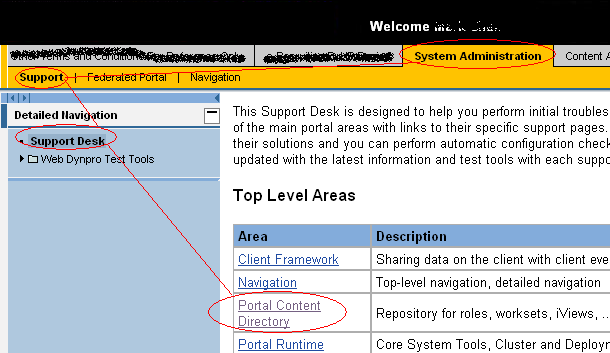
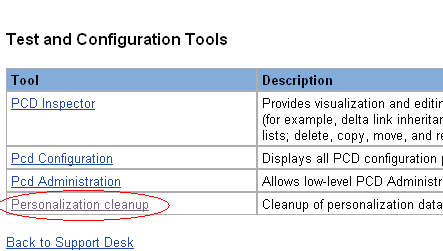
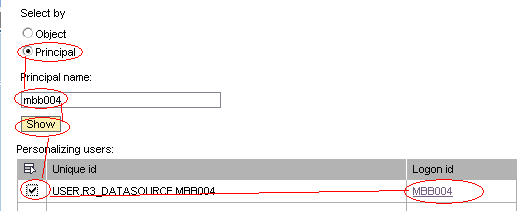
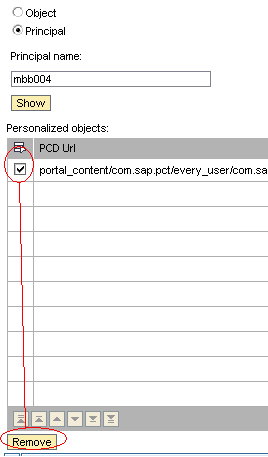
* Remember if you want to disable the user from doing the removing part.
remember to set in property of the page and select no option
"remove iview" option.
Problem : User remove iview "remove from page".
Solution :
1. Log into portal as admin.
2. Goto - System Administration - Support Desk - Portal Content Directory.
3. Click on Personalization cleanup.
4. Click on the radio button Principal.
5. Select the user login id.
6. Click Show.
7. Click into the "Logon ID"
8. Select the PCD URL on the users personalization
9. Click Remove.
Done
Graphical solution is below
* Remember if you want to disable the user from doing the removing part.
remember to set in property of the page and select no option
"remove iview" option.
Guided procedure

Recently we was given a task to detect the error after thepathces.
But it seems that the error was some how adesign brought by the PAST.
Anyway to debug the error you will need this few access.
Roles : -
Content Admind
Guided Procedure -> Design Time and Administrator.
Error found. This object is being locked by XXXuser.
Solution. Go to
Guided Procedure -> Administrator.
Unlock Object. Try to find the Object development to unlock
Error Page different from what it is supposed to be
Solution. Go to
Guided Procedure -> Design Time.
Click on the "Callable Object"
"Object Defination" Tab
and choose the correct HTML.
Notes: in order to make the changes reflected please do the activation from branches up to the highest.
Problem. (Error No Active Process Found)
The problem was the Activated processes was not found.
Solution:
Goto Guided Procedure -> Life and Work Events - MY -> Marriage -> Marriage Process (looks lika gears) -> click open
Goto Tab -> Instantiation ( click on the arrow button to go to the tab )
Copy the Process ID.
Then Go to portal Content
-> Content Provided by SAP\End User Content\Employee Self-Service\Custom Content\Life and Work Events
Open the "Iview" (Marriage)
Find the field "Application Parameters"
And change the process.template.id; eg. (process.template.id=88394210FCBB11DCC1F000145EC7373A&process.autostart=true)
--------------------------------------------------------
Error. The navigation on the left is not correct add or remove
Solution
Goto Guided Procedure -> Life and Work Events - MY -> Birth Deceased -> Birth Deceased Process (looks lika gears) -> click open
Goto Tab -> Roles, Click on the pencil to go to EDIT MODE
To delete . Click on the select the callable object ( looks like one jigsaw ).
To Add . Click on add branch and then select the callable object
Save and active everything from branches to parent.
Error. The pages kept going to page "initiate instances"
Solution.
Goto Guided Procedure -> Life and Work Events - MY -> Birth Deceased -> Birth Deceased Process (looks lika gears) -> click open
Goto Tab -> Roles, Click on the pencil to go to EDIT MODE
Select role type -> "initiator".
Save and activate

Infotype 41, infotype 0
Basically i am still new to abap / SAP.
All i know to access this two info to get the PA20 Transaction code
action type (0)
and
assigment Date (41)
while debugging for a program this is to get the hire date and rehiring date.
* warning this notes may not be correct :D

All i know to access this two info to get the PA20 Transaction code
action type (0)
and
assigment Date (41)
while debugging for a program this is to get the hire date and rehiring date.
* warning this notes may not be correct :D
How to disable or enable the help link in masthead iView
Refer to this link on how to go to masthead Iview
Show Link in Masthead: Help < NO >
* To disable or enable the help link on the top frame of the portl
The actual location of the iview
Portal Content
+ Content Provided by SAP
+ Admin Interfaces
+ Admin iView Templates
+ Portal Editors
Masthead

Show Link in Masthead: Help < NO >
* To disable or enable the help link on the top frame of the portl
The actual location of the iview
Portal Content
+ Content Provided by SAP
+ Admin Interfaces
+ Admin iView Templates
+ Portal Editors
Masthead
Useful URL
Wanna compile a section url for me (dummy)
-----------------------------------------------
2009 Aug 13 - http://www.sapabapnotes.blogspot.com/ - link provided by mawarni
2009 Aug 13 - http://www.sapbasisnotes.blogspot.com/ - link provided by mawarni
-----------------------------------------------
2009 Aug 13 - http://www.sapabapnotes.blogspot.com/ - link provided by mawarni
2009 Aug 13 - http://www.sapbasisnotes.blogspot.com/ - link provided by mawarni